Operational notes on managing throttling constraints through credential rotation in an effort to avoid intelligence brownout.
The Throttling Problem You Already Know About
Everyone who lives inside Claude Code knows the 5-hour rolling window, and everyone knows how fast it depletes. I won’t belabor it.
What’s worth saying is how Opus (now 4.7, since Opus 4.7 just launched) specifically chews through a window. On a real build day, I can torch a 5-hour quota in 20 to 30 minutes if I’m not careful. The weekly token ceiling adds another constraint on top.
That forced a discipline. Opus for high-level planning and the strategic bits where you actually want a thinking partner, Haiku for the long tail of granular implementation work. This is a skill that’s going to stay relevant: models keep getting better, but inference keeps being expensive, and the shape of this tradeoff isn’t going away.
The honest problem is that even with good discipline, the Pro ceiling is too low for any serious building day. Andrej Karpathy put this well in a talk on AI as infrastructure:
When LLMs go down or get throttled, the planet itself gets a little bit dumber. We’re treating intelligence like electricity: metered, provisioned, subject to brownouts when demand exceeds supply.
When I hit my window and the model downshifts or pauses, that’s an intelligence brownout. Reasoning goes offline right when I’m mid-thought.
The Obvious Answer, Which Didn’t Fit
Anthropic sells a Max 5x plan at $100/month. That is the obvious answer, and I looked at it.
It didn’t fit for two reasons:
- I’m already paying for a stack of AI tools. OpenAI’s advanced voice mode, for one, is genuinely better for the voice-first flows I use when driving. Those subscriptions add up.
- I don’t need 5x. I need a little more. Doubling my Pro capacity is plenty for how I actually work, especially with Codex picking up a real share of my day.
Paying $100/month for capacity I wouldn’t use felt like buying the wrong shaped tool.
Looking for an Actual Solution
Before I did anything cute, I wanted to make sure I wasn’t about to violate ToS. I dug around and found a Reddit thread where someone had emailed Anthropic directly and gotten a response: up to 3 accounts on the same phone number and payment card is allowed.
That changed the calculation. If the policy itself permits it, running more than one Pro account is just an operational choice, not a gray-area hack.
The Workflow: A Continuous Dance
The pattern that emerged is a rotation, not a “primary + backup.”
Account one burns through its 5-hour window. I switch to account two and keep going. By the time account two starts running thin, account one has rolled over and is ready again. It’s a continuous dance where at any given moment, at least one account has capacity.
The catch: doing this by hand is miserable. Logging out of Claude Code, logging into a different account, re-authenticating in the browser, redoing it on the CLI: that friction breaks flow hard enough that you stop rotating and just accept the brownout.
So I automated it.
AI Traffic Control: One-Click Credential Switching
I added a credential switcher to AI Traffic Control. One click swaps the active account under the hood. No browser dance, no re-login ritual.
The dashboard shows the Claude provider with a Switch button. When you tap it, a modal appears listing all registered accounts with their 5-hour and weekly usage metrics. Pick one, tap it, and new Claude sessions immediately start using those credentials.
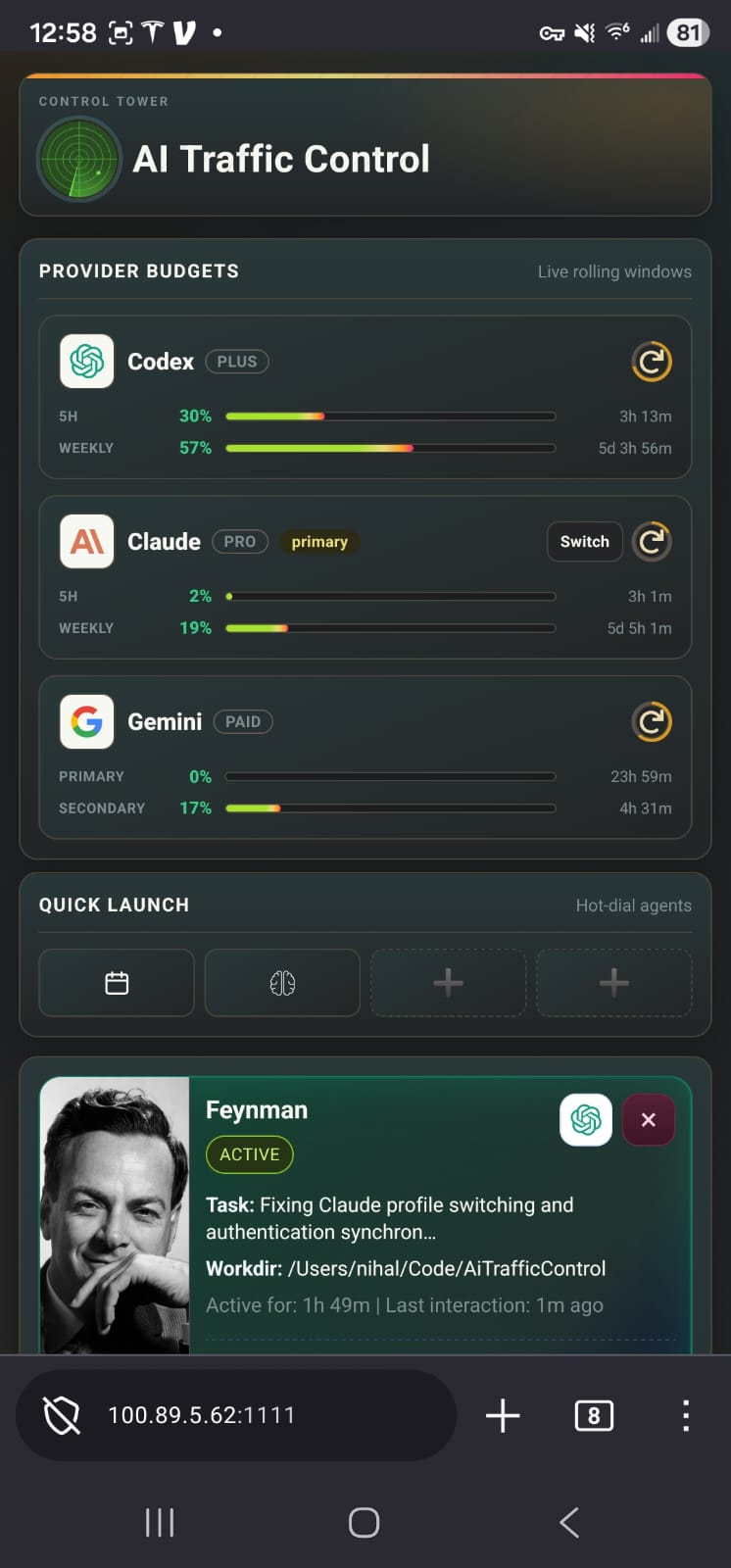
The dashboard shows a Switch button next to the Claude Pro provider. Tap it to open the account picker.
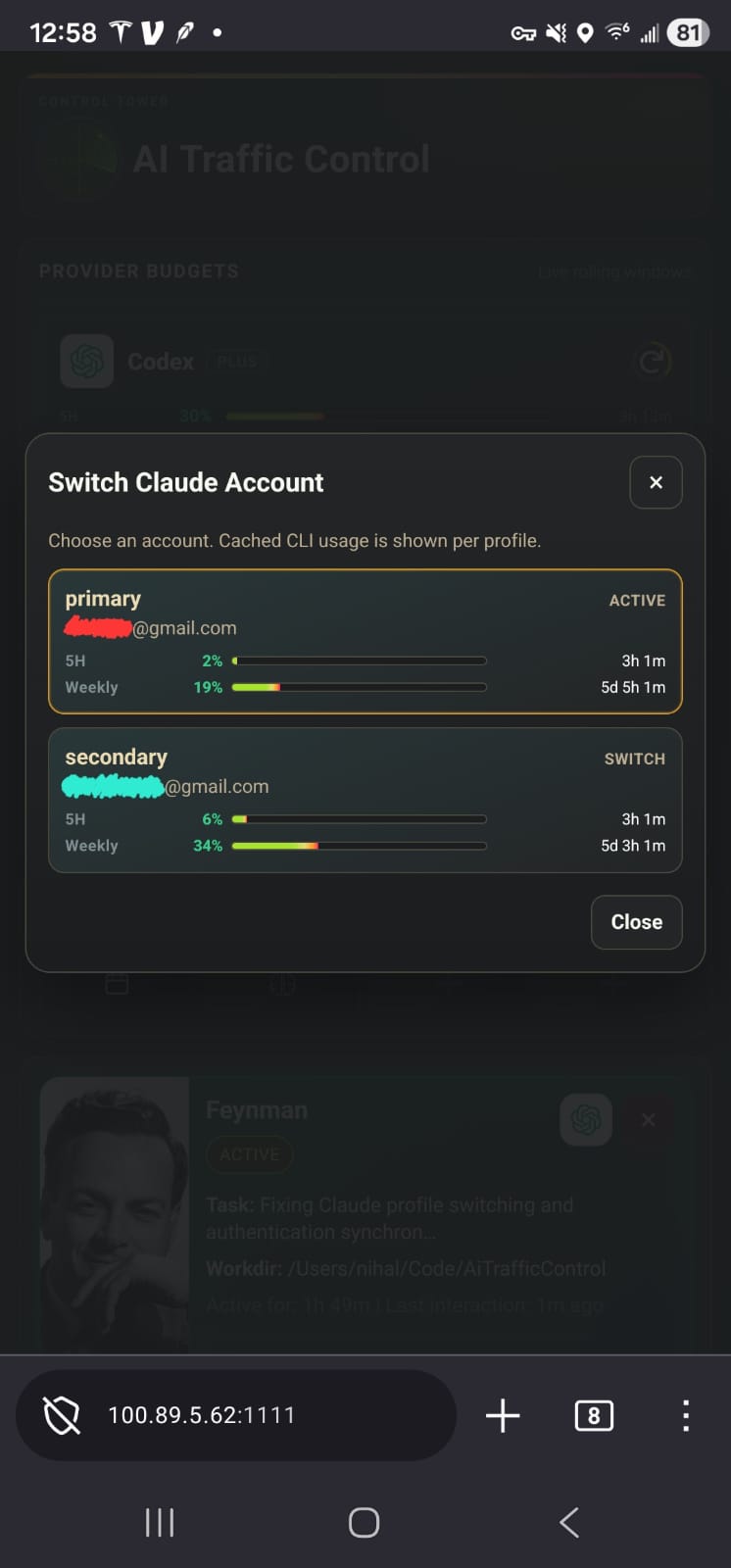
The modal displays all registered Claude accounts with their 5-hour and weekly quota usage. One click switches to a new account; new sessions use the swapped credentials immediately.
That solves the “which one am I on and how much is left” problem without me having to keep any of it in my head. Practically, I’m not Opus-rationing by feel anymore. I’m just reading the usage bars and picking the account with the most room.
The Setup Today
I’m running two Pro accounts, not three. At $20 × 2 = $40/month, that’s less than half the Max 5x price, and honestly doubling my window is already more than I’ve needed. If I ever hit that ceiling regularly, adding a third is a $20 decision, not a $100 one.
The only reason this works is the switcher. Without one-click rotation, I’d have quietly gone back to eating brownouts and pretending it was fine.
Closing
The meta-lesson here isn’t really about Claude subscriptions. It’s that once AI availability starts behaving like a utility (metered, rate-limited, occasionally browning out), the operational layer around it matters more than any single model choice. Rotation, tracking, one-click handoff. Boring infra for interesting work.
If intelligence is electricity, I’d rather own a switchboard than pay for a bigger meter I can’t fill.